# Welcome to H1 Code!
Samples, step-by-step guides, and reference documentation for HackerOne's code review platform.
HackerOne PullRequest is now H1 Code ✨[Learn More](https://www.hackerone.com/product/code). As we transition to this new naming, some parts of our product may still be shown as "PullRequest".
## Connecting to the HackerOne Code Application
### Cloud Integrations
[**Adding GitHub Repositories to HackerOne**](/customer-documentation/cloud-integrations/adding-github-repositories)
[**Adding Bitbucket Repositories to HackerOne**](/customer-documentation/cloud-integrations/adding-bitbucket-repositories)
[**Adding GitLab Projects to HackerOne**](/customer-documentation/cloud-integrations/adding-gitlab-projects)
[**Adding Azure DevOps Repositories to HackerOne**](https://docs.pullrequest.com/pullrequest-docs/cloud-integrations/adding-azure-devops-repositories)
### **On-premise deployments**
[**On-Premise Proxy Installation Guide**](https://docs.pullrequest.com/on-premise-server/)
## Features
| **GUIDES** | |
| ------------------------------------------ | ----------------------------------------------------------------------------------------------------------------------------------------------------------------------------- |
| **Assigning Code Reviews** | [Sending a Pull/Merge Request to the Network](https://docs.pullrequest.com/pullrequest-docs/assign-code-review-to-pull-request-network/assigning-github-code-reviews) |
| **Code Review Statuses** | [Pull/merge request fulfillment statuses](https://docs.pullrequest.com/pullrequest-docs/assign-code-review-to-pull-request-network/code-review-statuses) |
| **Collaborating with HackerOne Reviewers** | [Collaborating with PullRequest Reviewers](https://docs.pullrequest.com/pullrequest-docs/assign-code-review-to-pull-request-network/collaborating-with-pullrequest-reviewers) |
| **Posting feedback** | [Rating Code Reviews from HackerOne](/customer-documentation/assign-code-review-to-hackerone-code-network/rating-reviews) |
{% hint style="info" %}
Not seeing what you're looking for? Please reach out to your H1 Code team contact.
{% endhint %}
# Supported Integrations
## What source control providers is PullRequest compatible with?
PullRequest offers fast, self-serve integration with the following cloud-based providers:
* [**GitHub**](https://docs.pullrequest.com/pullrequest-docs/cloud-integrations/adding-github-repositories)
* [**Bitbucket**](https://docs.pullrequest.com/pullrequest-docs/cloud-integrations/adding-bitbucket-repositories)
* [**GitLab**](https://docs.pullrequest.com/pullrequest-docs/cloud-integrations/adding-gitlab-projects)
* [**Azure DevOps**](https://docs.pullrequest.com/pullrequest-docs/cloud-integrations/adding-azure-devops-repositories)
## Do you support on-premise instances?
Yes. We offer **PullRequest Proxy** which allows you to use PullRequest on-premise or in your private cloud.
This is available for:
* **GitHub Enterprise**
* **Bitbucket Server**
* **GitLab Self-Hosted**
* **Azure DevOps**
To get set up with a license of PullRequest Proxy, check out [our guide](https://docs.pullrequest.com/on-premise-server).
# What to Expect from H1 Code
Welcome to H1 Code customer documentation! You'll find a number of helpful articles linked below that will help you and your team understand more about our service:
* [How to Get More Out of Code](/customer-documentation/frequently-asked-questions/what-to-expect/how-to-get-more-out-of-code)
* [How fast is H1 Code?](/customer-documentation/frequently-asked-questions/what-to-expect/how-fast-is-h1-code)
* [Who is the H1 Code Community of Experts?](/customer-documentation/frequently-asked-questions/what-to-expect/who-is-the-h1-code-community-of-experts)
* [H1 Code's Conversational AI Agent](/customer-documentation/frequently-asked-questions/what-to-expect/h1-codes-conversational-ai-agent)
# How to Get More Out of Code
At HackerOne, we consider our community of code security experts to be a part of your team. We have provided some quick tips for making the most of your experience with Code.
### **Bite-sized merge requests**
While all sizes of merge request are taken and reviewed by the H1 Code community, we recommend that merge requests exceed **no larger than about 800 lines of reviewable code**.
Part of HackerOne's mission is to improve the overall speed and quality of your software development lifecycle. The larger a merge request is, the longer it takes to verify, make changes, validate, and eventually merge it. This is due to a larger-than-expected scope and the potential for more code churn involved after receiving the initial review and any follow-up reviews required.
### **Detailed change descriptions**
The code author should include a **detailed description that provides context for the changes involved**. This context can give code reviewers more direction and understanding of the scope involved to provide more relevant comments that align with the intent of the changes being made.
Helpful contextual information can include:
* **Background** on why the issues/features are being fixed/implemented.
* **Goals** on what the changes are trying to accomplish.
* Any **specific concerns** or risks associated with the changes.
### Have a conversation
Effective **code review requires communication**! As such, discussions within a code review comment can benefit from any of the following interactions:
* **Reply or react** to each comment with an emoji or comment accordingly. This ensures you have acknowledged or addressed each issue, which can provide evidence for continuing with a merge. We can also detect your sentiment through these types of reactions.
* **Give reasons** for any decisions made. For comments that are not going to be fixed, for example, explain why or indicate that there will be follow up in a later merge request.
* **Ask a question.** Make sure to follow up and get more details if something a reviewer said is unclear or questionable.
* **Ask for advice or help** in areas you are not comfortable with. Our reviewers are senior-level developers in various domain spaces and can help with wide range of topics.
### Let us know what you think
The customer success team at HackerOne gets notified of [every rating your team sends in](https://docs.pullrequest.com/customer-documentation/assign-code-review-to-pull-request-network/rating-reviews) for our reviewers. We actively work with our reviewers to ensure that this feedback is understood and that improvements are made. Positive or negative, provide more details so we can continue expanding efforts on the positive aspects or quickly remediate the negative aspects.
# How fast is H1 Code?
## How fast is H1 Code?
We aim to turn around pull/merge requests as fast as possible.
* Most detection & validation scanning completes in 2-4 minutes.
* Most code validation complete in less than 2 hours.
In case of emergency, the team should be aware that the *Code service will not block merge*.
n = 21,096 reviews (past 12 months)
Factors that contribute to variety of review turnaround times include:
* The size of the pull/merge request
* The complexity of the code changes
* The expertise required to review the code
Check out our optional guide for best practices when doing peer code review: [How to Get More Out of Code](/customer-documentation/frequently-asked-questions/what-to-expect/how-to-get-more-out-of-code)
# Who is the H1 Code Community of Experts?
## What do reviews from our engineers look like?
Think of H1 Code as an extension of your current team. An engineer will be reviewing your code before it is merged. Their feedback is posted in your source control provider alongside your internal developers. This means you'll be able collaborate with our engineers just like one of your teammates.

### Can I see some examples?
Yes!
* [https://github.com/oughtinc/ergo/pull/61]()
*
*
*
You can also check out our walkthrough/demo here:
## **What are HackerOne experts like?**
Reviewers are mostly based in the US and are senior-level software engineers with 5+ years\* experience building complex applications and systems.
Members come from a variety of backgrounds and include:
* Serial technical founders
* Major language/framework maintainers
* CS PhDs
* Technical project owners at companies like Google, SpaceX, Amazon, Uber, Instagram, Square, Dropbox, Microsoft, Zynga, Coursera, NASA, Lockheed Martin, Bloomberg, Moz, Procore, and many, many more.
Here are some guest contributions our reviewers have made to our blog:
[**What To Look For When Reviewing C#**](https://www.pullrequest.com/blog/reviewing-csharp-code/) by [Artak Mkrtchyan](https://www.linkedin.com/in/mkartak/)\
[**How to Write a Good Code Comment**](https://www.pullrequest.com/blog/how-to-write-a-good-code-comment/) by [Tyler Adams](https://www.linkedin.com/in/tyler-adams-60644714/)\
[**Writing A Great Pull Request Description**](https://www.pullrequest.com/blog/writing-a-great-pull-request-description/) by [Gonzalo Bañuelos](https://www.linkedin.com/in/gbanuel/)\
[**The Top 5 Mistakes Made in Angular Projects**](https://www.pullrequest.com/blog/top-5-mistakes-in-angular-projects/) by [Alain Chautard](https://www.linkedin.com/in/achautard/)\
[**Top 3 Security Vulnerabilities I Find in iOS and Android Projects**](https://www.pullrequest.com/blog/top-3-security-vulnerabilities-in-ios-android-projects/) by [Chris Griffith](https://www.linkedin.com/in/criggles/)

*\* With rare and extraordinary exceptions.*
# H1 Code's Conversational AI Agent
Meet HackerOne's very own conversational agent: h1-hai. Developers using HackerOne's [Code product](https://www.hackerone.com/product/code) can utilize this conversational agent directly within their merge/pull requests.
We developed this AI agent using [Anthropic](https://www.anthropic.com/) foundation models hosted in [AWS Bedrock](https://aws.amazon.com/bedrock). We do not perform any additional training on top of the foundation models. h1-hai only uses context from the pull request in scope, which includes relevant conversations and git diffs. This context is used to respond to users.
## How does it work?
Simply submit a comment within the pull request and tag @h1-hai. In most cases, the agent should respond within seconds.
## What can it do?
h1-hai can answer questions about the pull/merge request in scope, but it can also perform a number of actions to help make our user's experience with H1 Code more accessible. Below is a list of example prompts and tasks that are available.
### Gain context
Users can get help understanding information about H1 Code and how it works without sitting through a meeting with HackerOne or internal stakeholders. We will also be able to provide clarity on other parts of the review including scanner details or the review status. Not an English speaker? No problem. h1-hai supports responses in all major languages and can also help with translations.
* @h1-hai how does this work?
* @h1-hai what's the status of this PR?
* @h1-hai what scanners were run on this PR?
* @h1-hai what were the scanner findings for this PR?
Outside of getting context regarding the Code product, developers can also get context about the code itself or the entirety of the pull request:
* @h1-hai any issues with this code?
* @h1-hai can you suggest a remediation for the issue reported?
* @h1-hai what has happened so far in this pull request?
* @h1-hai create a diagram which explains how this new feature works
### Perform tasks
h1-hai can do more than talk. We've enabled Code's conversational agent with various capabilities that help developers get things done, as well. Say, for example, our scanning engines did not detect any risks, but the code author wants a review anyway. They can request it here. On the other side, the code author isn't needing a review, but one was requested. They're free to ask h1-hai to cancel the review.
Don't want to wait for a human to check that your remediation resolves the issue? Ask h1-hai:
Here are a few prompt examples:
* @h1-hai open a review for this PR
* @h1-hai please cancel the review for this PR
* @h1-hai please generate a PR summary for me
* @h1-hai remember this for next time (See Create Memories)
### Create Memories
One of the coolest things h1-hai can tackle is memory retention. Code authors can tell us to remember certain facts specific to their repository or organization and the agent will log that information as a future note, improving our ability to find valid issues. All development teams are different. Record your team's specific coding patterns, architecture, or preferences with h1-hai and we'll remember it for the future.
h1-hai will prompt the user to confirm that a memory makes sense and ask for a confirmation before proceeding. If an existing memory conflicts with the new memory, h1-hai will make a note of that and confirm before deleting the existing memory and creating the new one. All memories are logged on a per repository basis and can be accessed simply by asking "@h1-hai what memories do we have stored?"
Here are a few prompt examples:
* @h1-hai remember this for next time
* @h1-hai list the memories logged for this repository
# Supported Languages
H1 Code supports review for all programming languages, frameworks, libraries, platforms & versions.
Below is a non-exaustive overview of types of code the service supports.
### Programming Languages
**General-purpose languages**\
`Python`, `Java`, `C`, `C++`, `Ruby`, `PHP`, `R`, `Swift`, `Kotlin`, `Rust`, `Scala`, `Haskell`, `Go`, `Perl`, `Pascal`, `Objective-C`, `OCaml`, `Brightscript`, `Julia`,\
`COBOL`, `Dart`, `Solidity`, `Apex (Salesforce)`
**Web-specific languages**\
`JavaScript`, `TypeScript`, `VB.NET`
**Scripting**\
`Bash (Shell)`, `VBA`, `Nim`
### Web Development
**Markup languages**\
`HTML`, `XML`, `YAML`
**CSS frameworks and preprocessors**\
`CSS`, `SASS`, `SCSS`, `PureCSS`, `Material-UI`, `Foundation`, `Bootstrap`
**Front-end frameworks and libraries**\
`React`, `Angular`, `Backbone`, `Stimulus`, `jQuery`, `Three.js`, `Next.js`, `Sails.js`
**Back-end frameworks**\
`Django`, `Flask`, `Tornado`, `Web.py`, `Ruby on Rails`, `Sinatra`, `Padrino`, `Phoenix`, `Play`, `FuelPHP`, `Laravel`, `Slim`
**Templating engines**\
`Pug`, `Handlebars`, `Razor`, `Closure-Templates`, `Eruby`
### Databases
**Relational databases**\
`MySQL`, `SQL`, `PostgreSQL`
**NoSQL databases**\
`DynamoDB`, `Cassandra`, `Redis`
**Database query languages**\
`GraphQL`, `NoSQL`
### Cloud and DeveOps
**Cloud platforms**\
`AWS`, `GCP`, `Azure`
**Orchestration and configuration management**\
`Kubernetes`, `Terraform`, `Vagrant`, `Docker`, `Puppet`, `Chef`, `CDK`, `CloudFormation`
**CI/CD tools:**\
`GitLabCI`, `TravisCI`, `GitHubActions`, `CircleCI`, `Jenkins`
**Cloud services**\
`CloudWatch`, `Cognito`, `IAM`, `SQS`, `SNS`, `EC2`, `Lambda`, `OpenAPI`
### Frameworks and Libraries
**Web frameworks**\
`SpringMVC`, `Struts`, `ASP.NET`, `.NET`, `Hadoop`
**Data processing libraries**\
`NumPy`, `TensorFlow`, `Spark`
**Game engines**\
`Unreal Engine`, `Unity`
**UI libraries and tools**\
`Material-UI`, `Foundation`, `Flutter`
### Security and Testing
**Security tools**\
`Swagger`, `OpenAPI`, `IAM`
**Testing frameworks and tools**\
`Cucumber`, `Gherkin`
### Platforms and Engines
**Content management systems**\
`WordPress`, `Jekyll`
**Operating systems and environments**\
`Vagrant`, `Docker`
**Game engines**\
`Unreal Engine`
**Mobile development platforms**\
`iOS`, `Ionic`, `React Native`, `Android`
### APIs and Protocols
**API frameworks and tools**\
`Swagger`, `OpenAPI`, `APIGateway`
**Messaging services**\
`SNS`, `SQS`
### Misc
**General concepts/tools**\
`Web`, `YAML`, `XML`
**Blockchain technologies**\
`Ethereum`
## Limitations
Software development artifacts which require rendering or runtime execution, or tools written for project management, may be supported if maintained as code it Git repositories but may have limitations.
These include things like:
* Design files (e.g., Figma, Sketch)
* Project management or tasking platforms (e.g., Jira, Trello)
* Interactive games
{% hint style="info" %}
Need confirmation we support code review for what you need? \
Let us know at ****
{% endhint %}
# Create an Account
Setting up a new organization with Code.
### Create a user account
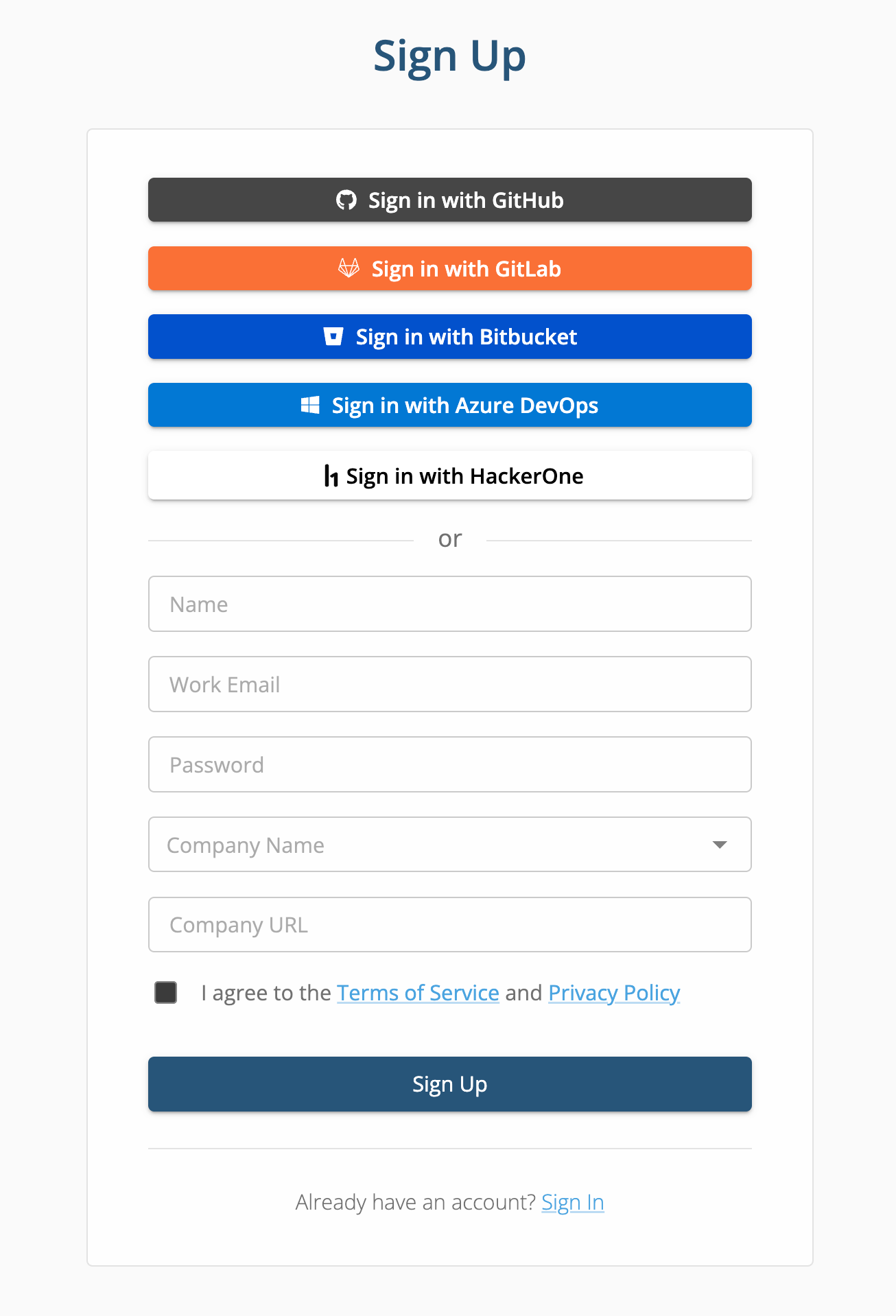
[**Click here**](https://app.pullrequest.com/signup) to create an account. You can create a user account by authenticating with GitHub, Bitbucket, GitLab, Azure DevOps, HackerOne, or by using your work email address.
{% hint style="info" %}
If you'll be integrating repositories from a cloud-based provider or joining a team with repositories already integrated, we recommend authenticating using the same provider provider service.
{% endhint %}
### Connect repositories
Select your version control provider for instructions on how to connect to repositories.
If you host your code on-premise, see [**Introduction to HackerOne Code for On-Premise Integrations**](https://docs.pullrequest.com/on-premise-server)**.** This requires installation of HackerOne's PullRequest Proxy which will be sent by your HackerOne team as a compressed package tarball. If you need this, please reach out to your HackerOne team contacts.
{% content-ref url="/pages/-M2-azm2YNK6v-zej736" %}
[Adding GitHub Repositories](/customer-documentation/cloud-integrations/adding-github-repositories)
{% endcontent-ref %}
{% content-ref url="/pages/-M2-bwyxPmZUe8YxLMOx" %}
[Adding Bitbucket Repositories](/customer-documentation/cloud-integrations/adding-bitbucket-repositories)
{% endcontent-ref %}
{% content-ref url="/pages/-M2-cXOerpBbMpymLNKD" %}
[Adding GitLab Projects](/customer-documentation/cloud-integrations/adding-gitlab-projects)
{% endcontent-ref %}
## Joining an existing team
Click the **Sign up with** button for your team's version control provider (GitHub, Bitbucket, GitLab, Azure DevOps) and you'll be added automatically.
Access to repositories will mirror the role configurations in your team's provider.
### My team's version control provider is self-hosted
If your team uses an on-premise installation (e.g., Bitbucket Server, Azure DevOps Server, GitLab Self-managed), you may be added automatically after signing up with your company email address and verifying it.
# Adding GitHub Repositories
This guide includes authorizing your GitHub account with HackerOne, installing the the H1 Code GitHub application (PullRequest) to your Organization, and syncing with your repositories.
HackerOne's GitHub application for our code security product is an a verified application in GitHub's official marketplace [listed as PullRequest](https://github.com/marketplace/pullrequest).
This application is compatible for GitHub Organizations using:
* [**GitHub.com (Cloud)**](http://github.com/)
* [**GitHub Enterprise Cloud**](https://docs.github.com/en/enterprise-cloud@latest/admin/overview/about-github-enterprise-cloud)
{% hint style="info" %}
Need instructions for **GitHub Enterprise Server** (on-premise)? See our [On-Premise Integration Guide](https://docs.pullrequest.com/on-premise-server).
{% endhint %}
## Dataflow Diagram
For a visualization of how H1 Code and our systems interact with your GitHub Organization and authorized repositories, see and download the diagram below.
Dataflow diagram
{% file src="/files/ezUXFWvFx06QzNFN3PJI" %}
Click to download
{% endfile %}
## Step 1: Authorize and Connect
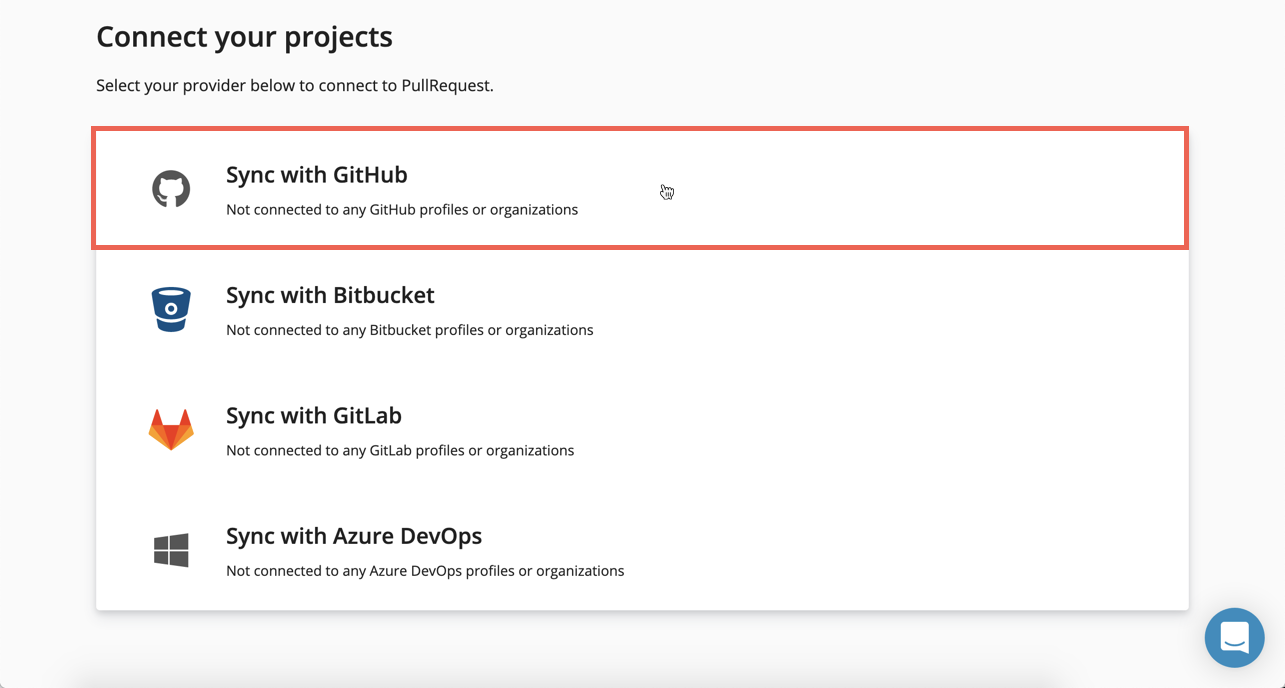
After [signing up](https://docs.pullrequest.com/pullrequest-docs/getting-started/create-an-account), you'll be prompted to authorize and connect with a version control hosting provider. Click the **Sync with GitHub** option.
{% hint style="warning" %}
GitHub Enterprise: Users with [Enterprise Owner ](https://docs.github.com/en/enterprise-cloud@latest/admin/managing-accounts-and-repositories/managing-roles-in-your-enterprise/abilities-of-roles#enterprise-owners)permissions are required to sign up by configuring a user name and password (not via the Sign in with GitHub option) before connecting projects and authenticating with GitHub.
{% endhint %}
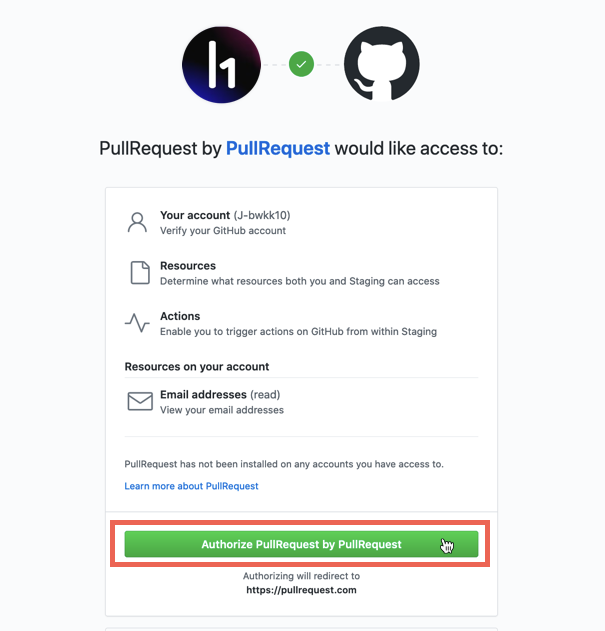
You'll then be asked to authorize your GitHub user account with PullRequest.
## Step 2: Install the PullRequest GitHub app
After authorizing with your GitHub account, you'll be directed to a page to select which GitHub Organization you want to install PullRequest on.
{% hint style="info" %}
**NOTE**: Every GitHub user account is treated like an Organization and will be shown in this list. It's likely you'll need to connect to your company's Organization instead of your GitHub user's Organization (see below).
{% endhint %}
You can [**click here**](https://github.com/apps/hackerone-code) to access this page directly.
Be sure to select the GitHub Organization your team uses rather than your GitHub username.
If a GitHub Profile or Organization already has PullRequest installed, the text **Configure** will appear on the selection.

{% hint style="warning" %}
**Q: I don't see the Organization I'm trying to add. How do I add it?**
A: You'll need to reach out to an Owner of your GitHub Organization with [**this link**](https://github.com/apps/pullrequest/installations/new) to complete the integration. We recommend also including the [**explanation of permissions**](https://docs.pullrequest.com/customer-documentation/cloud-integrations/adding-github-repositories#required-permissions) which describes what we need the integration permissions for and how we use them.
To determine who in your GitHub Organization has an Owner role, follow [**these steps**](https://docs.github.com/en/account-and-profile/setting-up-and-managing-your-personal-account-on-github/managing-your-membership-in-organizations/viewing-peoples-roles-in-an-organization).
{% endhint %}
## Step **3**: Select Repositories
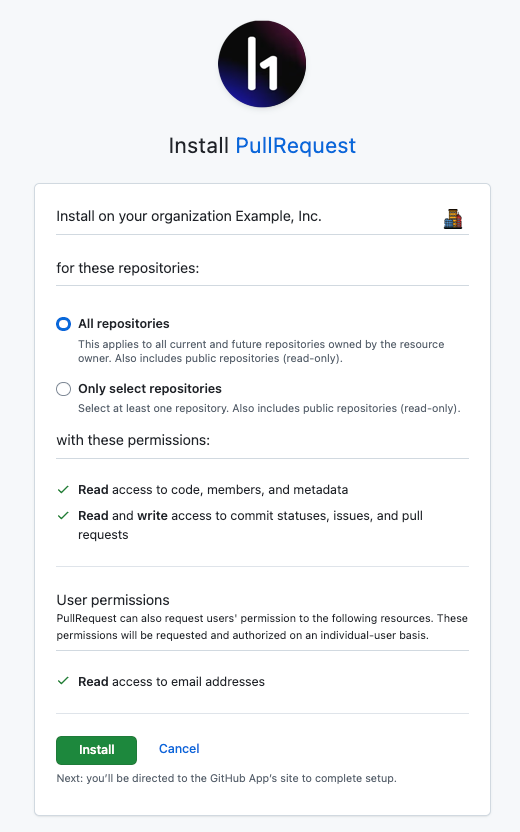
You'll be asked to allow PullRequest to access **All Repositories** or **Only select repositories**.
After you've made your selection, click the **Install** button.
### Required Permissions
Our integration adheres to the principle of least privilege, ensuring that it only has the access necessary to perform its intended function—providing valuable insights in pull request discussions. Here are the permissions we require and how we use them.
{% hint style="info" %}
**Required Permissions for GitHub.com and GitHub Enterprise Cloud Integration**\
[\
**Commit Statuses (Read and Write)**](https://docs.github.com/en/rest/commits/statuses?apiVersion=2022-11-28#about-commit-statuses)\
This allows our service to to mark the status of our scanning and validation operations based on relevant commits. These states include: `error`, `failure`, `pending`, or `success`. Statuses will be visible from the pull request in GitHub to let end users know a scan is in progress. When it completes, they'll see a high-level description of the outcome of the scan.
[**Issues (Read and Write)**](https://docs.github.com/en/rest/issues/issues?apiVersion=2022-11-28)\
We use the Issues permission to subscribe to events related to a pull request comment and for updating comment state (e.g., mark an inline comment as "Resolved"). GitHub's REST API considers every pull request an issue, which is why we need it in addition to the Pull Requests permission.
[**Pull requests (Read and Write)**](https://docs.github.com/en/rest/pulls/pulls?apiVersion=2022-11-28)\
This permission allows our system to detect pull requests, information about them our system needs for determining workflow executions and so end-users can interact with the service from the GitHub interface.
***Our service never updates or deletes source code in your repository***. Our integration DOES NOT execute any code-modifying operations.\
\
[**Members (Read-only)**](https://docs.github.com/en/rest/teams/members?apiVersion=2022-11-28#about-team-members)\
Our system uses this permission to [get](https://docs.github.com/en/rest/teams/members?apiVersion=2022-11-28#get-team-membership-for-a-user) and [list members](https://docs.github.com/en/rest/teams/members?apiVersion=2022-11-28#list-team-members) of the GitHub Organization which can be assigned service licenses in our systems and so it can determine what teams are visible to end-users.\
\
[**Contents (Read-only)**](https://docs.github.com/en/rest/repos/contents?apiVersion=2022-11-28)\
This allows our service to get contents of a repository as needed for code scanning and validation. For example, certain files within a repository that are unchanged in the pull request code diff may still be relevant for determining reachability of a detected issue. The Contents permission allows our system to call to GitHub with a `path` parameter to reference the contents it needs.\
\
[**Metadata (Read-only)**](https://docs.github.com/en/rest/authentication/permissions-required-for-github-apps?apiVersion=2022-11-28#repository-permissions-for-metadata)\
The Metadata permission is required for all GitHub applications. This allows our system to list repositories, contributors, know what contributors have access to, and ensure any changes in GitHub are up-to-date in our systems.\
\
[**Email addresses (Read-only)**](https://docs.github.com/en/rest/authentication/permissions-required-for-github-apps?apiVersion=2022-11-28#user-permissions-for-email-addresses)\
When a member of your team creates a user account, our system uses this permission to apply the email address for their GitHub user to user profile in our systems. We use email communication for service events, occasional product release notes, and in case our staff need to reach out directly.
{% endhint %}
### IP Allowlisting
If your GitHub Enterprise organization uses an IP allow list and the Projects page shows "No projects found" after completing the steps above, your IP allow list may be blocking our application's API access.
The HackerOne Code GitHub App declares its own IP addresses. To allow access, enable **"IP allow list configuration for installed GitHub Apps"** in your organization or enterprise security settings. GitHub documents this under [Allowing access by GitHub Apps](https://docs.github.com/en/enterprise-cloud@latest/admin/configuring-settings/hardening-security-for-your-enterprise/restricting-network-traffic-to-your-enterprise-with-an-ip-allow-list#allowing-access-by-github-apps) and [Managing allowed IP addresses for your organization](https://docs.github.com/en/enterprise-cloud@latest/organizations/keeping-your-organization-secure/managing-security-settings-for-your-organization/managing-allowed-ip-addresses-for-your-organization).
{% hint style="info" %}
If your organization manages IP restrictions at the Enterprise level rather than the organization level, an Enterprise Admin will need to enable this setting.
{% endhint %}
## Step 5: View Repositories
Your repositories should now appear on our [**dashboard**](https://app.pullrequest.com/dash/) page when the GitHub Organization is selected from the Organizations drop-down menu at the top-left portion of the screen.
{% hint style="info" %}
**NOTE:** This guide contains screenshots from third-party partner interfaces that may be modified without notice. If you have any issues or questions about connecting with HackerOne Code, please reach out to your accounts team.
{% endhint %}
# Adding Bitbucket Repositories
## Step 1: Enable Bitbucket Cloud development mode for the PullRequest Bitbucket app
Integration with Bitbucket involves connecting to the PullRequest Bitbucket app (which is private, not listed in their public marketplace). First you'll need to add the PullRequest Bitbucket app descriptor to your Bitbucket Workspace.
You can do this by accessing:
> \\*\*/workspace/settings/addon-management
Or, open your Bitbucket Workspace and go to **Settings** -> **Installed Apps** (under the APPS AND FEATURES section).
Click the **Install app from URL** link and enter the following URL into **App URL** field:
> `https://app.pullrequest.com/bitbucket/descriptor`

## Step 2: Authorize and Connect
After [signing up](https://docs.pullrequest.com/pullrequest-docs/getting-started/create-an-account), you'll be prompted to authorize and connect with a version control hosting provider. Click the **Sync with Bitbucket** option.

You'll be prompted by Bitbucket to grant access to your Bitbucket user account.

## Step 3: Install the PullRequest Bitbucket app
After authorizing with your Bitbucket user account, you'll be directed to page in connect with the Bitbucket add-on. Select the Bitbucket Workspace you'd like to connect PullRequest with and click the **Grant Access** button.

{% hint style="info" %}
If you're unable to grant access because developer mode is not enabled, make sure the setting is enabled for your Workspace (see **step 1**).
{% endhint %}
{% hint style="warning" %}
**Q: I don't see the Bitbucket Team I need to add from the Bitbucket drop-down selector. How do I add it?**
A: You may not have admin credentials to authorize the PullRequest Bitbucket app. Contact an administrator of your Workspace and have them install the application with from [**this link**](https://bitbucket.org/site/addons/authorize?descriptor_uri=https://app.pullrequest.com/bitbucket/descriptor\&redirect_uri=https://app.pullrequest.com/bitbucket/callback/landing).
**NOTE:** You maintain full control of revoking PullRequest access at any time.
{% endhint %}
## Step 4: View Repositories
Repositories should now appear on the PullRequest [**dashboard**](https://app.pullrequest.com/dash/) page when the Bitbucket Workspace is selected from the Organizations drop-down menu at the top-left portion of the screen.

## Step 5: Add PullRequest posting user to your team
In order for PullRequest reviewers to post feedback in your Bitbucket pull requests, a PullRequest posting user must be added to your Workspace.
Open your Bitbucket Workspace and go to **Settings** -> **User groups**.
This can be accessed from:
> \\*\*/workspace/settings/groups
Then click the **Add member** button.

This will open a modal for adding team members.
In the Email field, add: `bitbucket@pullrequest.com`
In the Groups field, apply any Bitbucket Group(s) with access to the repositories you'd like PullRequest to review for.
Usually the default group is **Developers**, but this varies depending on how roles are assigned in your Bitbucket Workspace.
If the PullRequest team member isn't added immediately (in an "Invitation Sent" state), it should be added within a few hours. Reach our to if you need this expedited or run into any issues.

{% hint style="info" %}
**NOTE:** This guide contains screenshots from third-party partner interfaces that may be modified without notice. If you have any issues or questions about connecting with PullRequest, please reach out to .
{% endhint %}
# Adding GitLab Projects
In order for our system to post feedback to your GitLab merge requests, a posting user must be added to your team.
## Step 1: Designating a Posting User
GitLab requires a user account to post inline feedback to merge requests. We have a global user ([@PullRequestBot](https://gitlab.com/PullRequestBot)) which can be used for this.
You can also create your own H1 Code service user for interacting with GitLab merge requests.
{% hint style="info" %}
**NOTE**: If your organization uses SAML, you WILL NOT be able to use the [@PullRequestBot](https://gitlab.com/PullRequestBot) global user. A new user in your GitLab Group will need to be created.
{% endhint %}
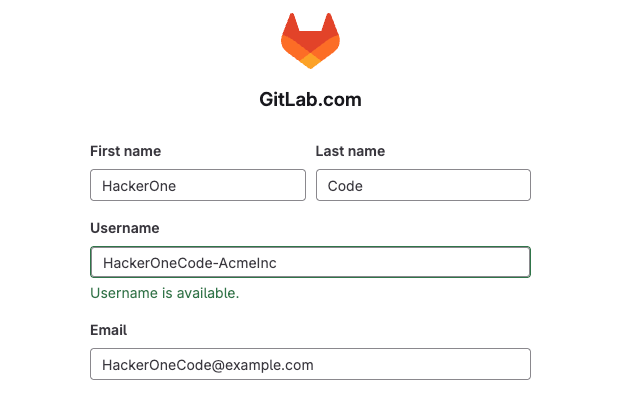
### Create a Service User for HackerOne Code
First, create a new user that will have access to all Projects or Projects in scope of service.
HackerOne Code will use this user to post scan results and validated issues.
**\*\*\*We strongly recommend adding the following image as the posting user's avatar and** `Hackerone Code` **as part of the Username**. This provides a much better end-user experience; it allows the service to be easily identified in the GitLab interface:
{% file src="/files/OBk998HAFQRbqiafYMOH" %}
Creating a new GitLab user
### Log in to GitLab as a user with permission to invite members
{% hint style="info" %}
**NOTE:** If your organization's GitLab instances contains Repositories in Projects spanning multiple Groups, these steps will be required for each group.
{% endhint %}
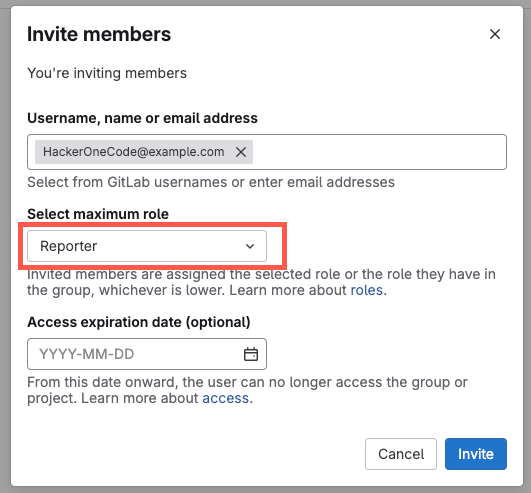
Navigate to **Group Information** -> **Members** in the side bar.
Click **Invite Members**.
{% hint style="danger" %}
The user taking this action will need to have at least the [Maintainer role](https://docs.gitlab.com/user/permissions/#user-management) of a Group. If the "Invite members" option isn't visible, you may need to work with a team member with an Owner or Maintainer role within the Group to take this action
{% endhint %}
In the **Username or email address** field, search for the newly created user and select the **Reporter** role.
{% hint style="info" %}
The service user requires **Reporter** access and will need to be added to all of the Projects in scope of service. We recommend inviting the user to the root-level Group so there's no disruption in service if you add or move repositories in the future.
{% endhint %}
### Log into HackerOne Code with the new service user
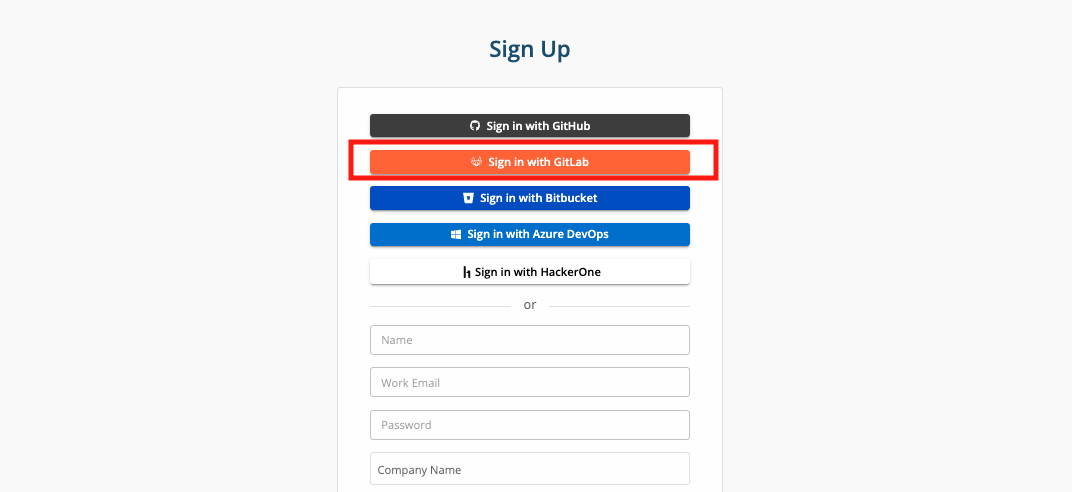
Connect the newly created GitLab user account to H1 Code via our OAuth sign-up flow by clicking on [Sign Up with GitLab](https://app.pullrequest.com/signup).
Once the account is connected, please let your HackerOne team know and we can configure that account to be the one that your code review feedback is posted from.
## Step 2: Authorize GitLab Group Integration
{% hint style="info" %}
**The following steps must be completed by a GitLab user with an Owner role for the Groups and Projects that need to be integrated.**\
\
If you're still logged in as the new GitLab service user for H1 Code, be sure to log out and log back in to GitLab as your standard user for your organization.
{% endhint %}
After authenticating with GitLab, you'll be prompted to authorize and connect with a version control hosting provider. Click the **GitLab** option.

You'll then be asked to authorize your GitLab user account with HackerOne's GitLab application: **HackerOne Code**.
{% hint style="info" %}
**NOTE:** The application and entity name 'HackerOne Code' is expected. This is separate from [HackerOne's GitLab integration](https://docs.hackerone.com/en/articles/10394699-gitlab-setup) for disclosure and bounty programs. [Read more](https://techcrunch.com/2022/04/28/hackerone-buys-yc-backed-pullrequest-to-add-code-review-to-bug-squashing-platform/)
{% endhint %}
## Step 3: Select GitLab Group
You'll be prompted with a list of GitLab Groups associated with your GitLab account.
Select the Group you'd like to connect with and click **Next**.
{% hint style="info" %}
**NOTE:** Multiple GitLab Groups can be connected. You can add more later if necessary.
{% endhint %}

{% hint style="warning" %}
**Don't see the Group you need?**
\
GitLab account used to connect repositories with HackerOne Code must be an Owner.
Reach out to a team member with these credentials and ask them to sign up for HackerOne Code and [connect](/customer-documentation/cloud-integrations/adding-gitlab-projects#step-1-authorize-and-connect). At that point, Project and Group details should be available to non-Owner members in the H1 Code dashboard.
{% endhint %}
## Step 4: Select GitLab Projects (Repositories)
Next, you'll be prompted to select which GitLab Projects (repositories) you'd like to connect to HackerOne Code.
You can select multiple Projects within the Group, or All Projects (recommended).

{% hint style="info" %}
**NOTE:** If practical, we recommend selecting **All Projects** as this will also automatically connect future repositories and include a more comprehensive overview of your development activity across all repositories in your GitLab Group in our metrics dashboards.
Connecting repositories to *will not* initiating H1 Code scans or incur any additional fees/overages. These will be configured later.
{% endhint %}
## Step 5: View Repositories
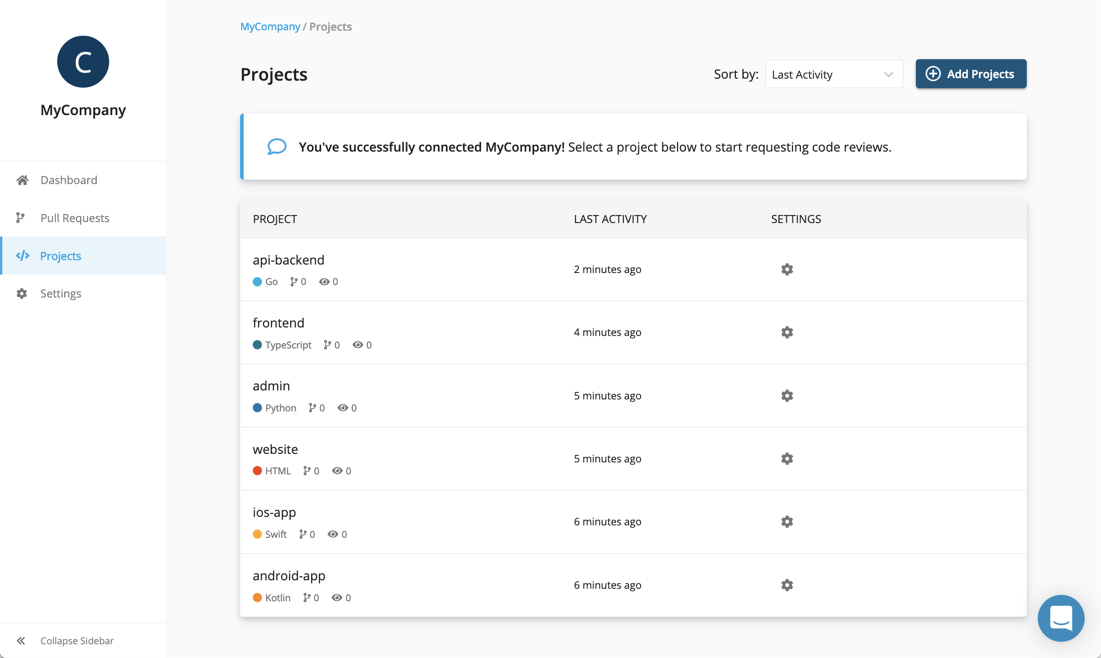
Repositories should now appear on the HackerOne Code [**dashboard**](https://app.pullrequest.com/dash/) page when the GitLab Group is selected from the Organizations drop-down menu at the top-left portion of the screen.
{% hint style="info" %}
**NOTE:** This guide contains screenshots from third-party partner interfaces that may be modified without notice. If you have any issues or questions about integration, please reach out to your HackerOne team.
{% endhint %}
# Adding Azure DevOps Repositories
This guide includes steps for creating and configuring an Azure DevOps user personal access token, authorizing an Azure DevOps account with H1 Code, installing, and syncing repositories.
{% hint style="warning" %}
To complete this setup, a user designated as an organization owner for the relevant Azure DevOps organization will need to create an account with HackerOne’s Code application. See Step 4 ("Authorize and Sync Organization Projects"). They will also be responsible for configuring the personal access token in Step 8.
{% endhint %}
## Step 1: Invite a H1 Code service user
{% hint style="info" %}
HackerOne recommends creating a dedicated service user to run the Code service. While highly recommended for an optimal developer experience, this step is optional because the only requirement is that a personal access token is created (Step 2) by someone in the target organization with **Basic** permissions.
Some notable caveats for not using a dedicated service user:
* The user that supplies the PAT will have their name displayed when feedback is posted to pull requests, which would likely create a confusing experience for development teams. A new user will grant the ability to configure the posting user with a name like “H1 Code”.
* The user could change roles or leave the organization, which could cause a temporary outage until a new user can be identified to take their place. An IT-managed service user could be beneficial for this reason.
{% endhint %}
A user, whether a dedicated service user or an existing user, will be required to allow Code to post comments to your team’s pull requests via its personal access token. Ensure that this user has access to all repositories intended to be in scope of the H1 Code service. If possible, we recommend selecting "**Add all"** Project access so there's no disruption in service as coverage is needed. Control for restricting and enabling service for certain repositories will be available through the product dashboard (see [Step 6](#step-6-select-repositories)).
## Step 2: Creating a Personal Access Token
Whether using a dedicated service user (as recommended in [Step 1](#step-1-invite-a-hackerone-code-service-user)) or using an existing user, a personal access token (PAT) will need to be created and later supplied (see [Step 8](#step-8-configure-the-posting-user-personal-access-token-pat)) to complete setup of the Code service.
{% hint style="info" %}
**Note**: Some users may not be capable of creating PATs for their organization. Review Azure DevOps documentation on prerequisites [here](https://learn.microsoft.com/en-us/azure/devops/organizations/accounts/use-personal-access-tokens-to-authenticate?view=azure-devops\&tabs=Windows#prerequisites).
{% endhint %}
From Azure DevOps, do the following to create a PAT to be used for H1 Code:
1. Navigate to **User settings** → **Personal access tokens**
2. Add “**New Token**”
3. Configure the following details:
1. **Name**: “H1 Code” or similar
2. **Organization**: Select Relevant Organization(s)
3. **Expiration**: Select the expiration date that aligns with your organization’s policies. Azure DevOps will notify the owner of the PAT via email when it is nearing its expiration date.
4. **Scopes**: Custom defined
1. Code Read
2. (**Show all scopes**) Pull Request Threads Read & Write
### Required Permissions for the Personal Access Token
{% hint style="info" %}
**Required Permissions for Azure DevOps Integration**
[Code (read)](https://learn.microsoft.com/en-us/azure/devops/integrate/get-started/authentication/oauth?view=azure-devops#scopes)
To enable our service to verify which projects are in scope, it requires the `vso.code` scope.
[Pull Request Threads (Read & write)](https://learn.microsoft.com/en-us/azure/devops/integrate/get-started/authentication/oauth?view=azure-devops#scopes)
To enable our service allow HackerOne engineers to read and interact with end users via pull request comments, it requires the `vso.threads_full` scope.
{% endhint %}
## Step 3: Create a user account by authenticating with Azure DevOps
If it hasn't been done already, visit[ https://app.pullrequest.com/signup](https://app.pullrequest.com/signup) and create a user account by authenticating with Azure DevOps.
{% hint style="warning" %}
**Note:** Any user can create an account, but only organization owners for the relevant Azure DevOps organization can create the "owner" user account needed to install repositories and complete initial setup.
{% endhint %}
## Step 4: Authorize and Sync Organization Projects
After [signing up](https://docs.pullrequest.com/pullrequest-docs/getting-started/create-an-account), you'll be prompted to authorize and connect with a version control hosting provider. Click the **Sync with Azure DevOps** option.
You'll then be prompted to authorize your Microsoft account with the H1 Code's PullRequest app, click **Accept**.
### Required Permissions for Authenticating with Azure DevOps
Our integration adheres to the principle of least privilege, ensuring that it only has the access necessary to perform its intended function—providing valuable insights in pull request discussions. Here are the permissions we require and how we use them.
{% hint style="info" %}
**Required Permissions for Azure DevOps Integration**\
\
[**Code (read)**](https://learn.microsoft.com/en-us/azure/devops/integrate/get-started/authentication/oauth?view=azure-devops#scopes)\
To enable our service to verify which projects are in scope, it requires the `vso.code` scope. \
\
[**Code (status)**](https://learn.microsoft.com/en-us/azure/devops/integrate/get-started/authentication/oauth?view=azure-devops#scopes)
The `vso.code.status` scope is required to create and get statuses associated with a pull request or an iteration. This is necessary for our system to post back results of automated scans and communicate workflow state to end-users in the Azure DevOps interface.
\
[**Project and team (read)**](https://learn.microsoft.com/en-us/azure/devops/integrate/get-started/authentication/oauth?view=azure-devops#scopes)
To keep project, repository and team information up-to-date in our dashboard tools, the service requires the `vso.project` Project and Team scope.
\
[**Graph (read)**](https://learn.microsoft.com/en-us/azure/devops/integrate/get-started/authentication/oauth?view=azure-devops#scopes)
Dashboard visibility and access to configuration settings in our dashboard are based on the end-user's permissions in Azure DevOps. Our system relies on the `vso.graph` Graph & Identity scope to ensure access within the service is based on access within Azure DevOps and is always up-to-date.
{% endhint %}
## Step 5: Configuring scope of Azure DevOps projects
After authorizing with your Microsoft account, you'll be directed to a page to select the Azure DevOps Organization(s) in scope of service.
{% hint style="info" %}
**NOTE**: Some Microsoft user accounts are treated like as Organization and will be shown in this list. It's likely you'll need to connect to your company's Organization instead of your Microsoft username (see below).
{% endhint %}

## Step 6: Select Repositories
You'll be asked to allow to access **All repositories** or **Only select repositories**.
{% hint style="success" %}
If practical, we recommend selecting the **All repositories** option so you won't need to repeat this step each time your team creates a new repository. Note that new repository installations would require that the Azure DevOps user with the owner permissions return to complete these same steps to connect.
{% endhint %}
After you've made your selection, click the **Connect** button.

## Step 7: View Repositories
Your repositories should now appear on the [**dashboard**](https://app.pullrequest.com/dash/) page when the Azure DevOps Organization is selected from the Organizations drop-down menu at the top-left portion of the screen.

## Step 8: Configure the Posting User Personal Access Token (PAT)
From the Code dashboard, navigate to **Settings** → **Owner Settings**. Take the personal access token generated in Step 2 and enter it in the field under "Configure posting user personal access token" before saving.
Azure DevOps development teams are now ready to start running Code. Projects in scope of the Code service may now be selected to start by toggling them to “**Auto**” from Review Settings (**Settings** → **Review** **Settings**). Any repositories installed can be turned off or on at any time through this view.
\
##
# On-Premise Support
[View on-premise support documentation here](https://docs.pullrequest.com/on-premise-server/).
# Assigning Reviews to H1 Code
## Step 1: Make sure your repositories are connected
Open [**User Settings -> Account Integrations**](https://app.pullrequest.com/dash/user/settings/integrations) to make sure you're connected to the correct version control provider.
Click **Configure** to make sure expected repositories have been connected to PullRequest.
For more information, refer to our integration guides:
* [**Adding GitHub Repositories**](https://docs.pullrequest.com/pullrequest-docs/cloud-integrations/adding-github-repositories)
* [**Adding Bitbucket Repositories**](https://docs.pullrequest.com/pullrequest-docs/cloud-integrations/adding-bitbucket-repositories)
* [**Adding GitLab Projects**](https://docs.pullrequest.com/pullrequest-docs/cloud-integrations/adding-gitlab-projects)
* [**Adding Azure DevOps Repositories**](https://docs.pullrequest.com/pullrequest-docs/cloud-integrations/adding-azure-devops-repositories)
## Step 2: View your Organization's Pull/Merge Requests
Log in to the H1 Code platform [**PullRequest**](https://app.pullrequest.com/) and select the appropriate **Organization** from the selector at the top of the screen. Then select **Pull Requests** from the sidebar.
{% hint style="info" %}
**NOTE**: The name of the tab will be **Merge Requests** if you're using GitLab.
{% endhint %}

## Step 3: Send a pull/merge request to our network
Click the **Send to PullRequest** button on any of the code reviews you need to assign to the network to get reviewed.

{% hint style="info" %}
**NOTE**: You may be prompted to enter billing information if it's missing for your organization.
{% endhint %}
The status will change to "Sourcing Reviewers."

# Code Review Statuses
## H1 Code Review Statuses
When one of your pull or merge requests is sent to the network to get reviewed, we display the fulfillment status in the H1 Code platform on our [**PullRequest dashboard**](https://app.pullrequest.com/dash/1/PullRequestInc).
## Send to PullRequest

This will be displayed as a blue button. It indicates that the pull or merge request is **not currently actively awaiting review from the HackerOne network of experts**.
Clicking the button will send it to the network to get reviewed.
## Sourcing Reviewers

This status will be displayed when:
* The pull/merge request has been sent to the network.
* Our internal team and internal systems have alerted qualified engineers that it's available, but reviewers haven't been assigned to it yet.
## Review In Progress

This status will be displayed when:
* The pull/merge request has been sent to the network.
* It has been assigned to a reviewer or a team of reviewers.
* The reviewers are currently working on it, but have not posted a review of code yet.
## Reviews Submitted

This status will be displayed when:
* The pull/merge request has been sent to the network and **reviewers have posted at least 1 review of the code**.
### Review submission info & features
#### Number of reviews submitted
Reviewers are assigned to a pull/merge request as long as it's open, and will likely submit multiple rounds of feedback. This will be indicated by the counter in the status.

#### When PullRequest last reviewed the code
The "time ago" timestamp next to the status indicates when the code was last reviewed by PullRequest

#### Notifying reviewers of changes

Below the review submission status is a **Notify reviewers of updates** link. Clicking this will send notifications to the reviewer(s) assigned that you've made updates and you'd like them to review it again.
{% hint style="info" %}
**We automatically notify assigned reviewers:**
* **If you've replied to one of their comments.**
* **If a new commit has outdated one of their comments.**
So it's likely the reviewers have already been notified.
{% endhint %}
An example of when it'd be important to click this link is if changes to another file have been added as part of the the pull/merge request *after* the code was reviewed by PullRequest.
# Collaborating with H1 Engineers
## Our Reviewers
The experts conducting security risk validation and code review are all members of our [Reviewer Network](https://www.pullrequest.com/reviewers/). They're software engineers with 5+ years of application security / engineering experience who are all thoroughly vetted and notably experienced in peer code review for pull/merge requests. Many are maintainers or core contributors of major languages, frameworks, and libraries.
All inline comments posted to pull or merge request are written by people - members of the Reviewer Network. A display name and avadar will be shown on these so you can distinguish between reviewers and know who you're working with over time (see below).
A display name and avatar thumbnail will represent the reviewer who posted the comment and you're interacting with
## When and how they're assigned
When a pull or merge request is assigned to a reviewer or team of reviewers based on possible risks detected, they'll typically be assigned to it until it is merged, closed, or network review is canceled.
After review feedback is posted, our reviewers can revisit it to answer your questions and review follow-up change commits.
## What reviewers have visibility into
The Reviewer platform tools are like an in-browser IDE built specifically for reviewing code. The files and changes are represented very similarly to how they'd be seen in a Git provider, but there are additional tools for gaining context - like searching the entire repository to examine relevant files that aren't part of the change set.
HackerOne reviewers have access to:
* The pull/merge request diff and the contents of the files involved.
* Metadata including the pull/merge request title, description, author username, branch names, event timestamps, and commit history.
* Your repository's `README.md` file.
* Any dependency management files such as `package.json` belonging to the repository.
* These are referenced so reviewers can provide recommendations based on things like the version of a framework being used.
* Any project-level notes provided by your organization, HackerOne staff, and other members of the Reviewer network who have worked with your team on prior pull/merge requests.
{% hint style="danger" %}
Reviewers **DO NOT** have access to any external resources that are not publicly accessible. Examples of things reviewers do not have access to include:
* Other pull requests or issues in a private GitHub repository.
* Project management tool links such as Jira tickets.
* CI/CD tools such as CircleCI or Jenkins.
* Any of your team's internal documentation that requires user login.
* An IDE and your full repository.(Reviewers are not a custom configured IDE but can give you pointers on how to properly set yours for style)
* The ability to commit their own corrections to your pull request.(Unless you are an OSS customer but this is generally not expected).
{% endhint %}
### Get the most out of the process by adding a great description
Just like for members of any development team reviewing teammates' code, a thorough description of the change, the intent of the changes, and any other relevant information will help reviewers provide great feedback and suggestions.
This includes screenshots, however these are only supported for Github Repositories!
## How and when reviewers are notified of changes
The platform notifies reviewers whenever important updates are made. These include:
* Comments that you've posted that require their attention.
* New commits are pushed to address feedback.
* When you request the changes are reviewed again.
### Addressing reviewers in comments
HackerOne reviewers will receive a notification that they've been mentioned in a comment in several ways.
#### Replying to a comment
If you reply to a reviewer in an inline thread, any reviewer that participated in the thread will be notified.

#### Including the reviewer's display name or \`pullrequest\` in a comment
If you post a comment that includes the reviewer's display name or string `pullrequest` (all one word, case insensitive) reviewers will be notified of your comment.
{% hint style="warning" %}
**NOTE:** To be notified by display name, the reviewer will need to be already assigned to the code review.
{% endhint %}

### New commits that address reviewer feedback
When you push additional commits to a pull or merge request branch that "outdate" comments posted by reviewers, they'll receive a notification that you've made a change that likely addressed one of their comments and that they should circle back and verify the new state.

#### Requesting another review
After at least one feedback submission has been posted to your pull or merge request by reviewers in the network, you can send a notification to any reviewers assigned asking to re-review the changes.
This is useful if you've updated the branch to include additional changes that would otherwise not alert reviewers.
{% hint style="warning" %}
**NOTE**: We strongly recommend adding a comment to the pull or merge request, or update the description, letting reviewers know why you've sent this notification.
{% endhint %}
You can do this by accessing the [**PullRequest dashboard**](https://app.pullrequest.com/) and clicking the **Notify reviewers of updates** link.

{% hint style="info" %}
Read more about code review statuses [**here**](https://docs.pullrequest.com/pullrequest-docs/assign-code-review-to-pull-request-network/code-review-statuses)
{% endhint %}
# Rating Reviews
We aim to help developers and teams at the highest level.
In an ongoing effort to ensure we provide the very best experience for our customers, we encourage code authors to submit ratings and provide feedback for the code reviews they receive from our developer network.
{% hint style="info" %}
**Rating reviews helps us ensure you're matched with reviewers from our network who are a great fit for your team.**
{% endhint %}
## **How to rate & provide feedback for a code review**
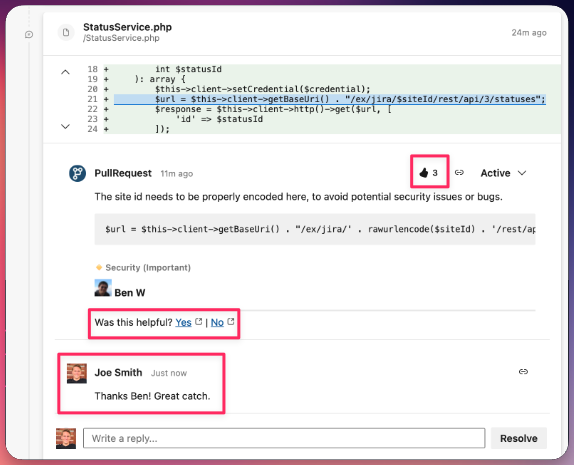
Every code review summary includes a footer with links to indicate if the review feedback provided was helpful or not. All you have to do is click one of the links.
In addition to direct feedback through ratings, we also utilize automatic sentiment detection. We use both responses in threads and emojis to make an assessment on how the review is received. The best case scenario for our code authors and customer teams is to respond to our feedback in one of these ways.
# Requesting Code Review for bulk files and projects
In some circumstances, you may want specific parts of a git repository reviewed by the PullRequest network outside the context of a pull/merge request (i.e., a collection of files or the entire repository).
The following steps outline the most secure way of creating a PullRequest review job within your version control hosting provider**.**
## Steps:
**1.** Check out a local copy of the latest code for the repository that you want reviewed.
**2.** **`cd`** into your local repository's root directory.
**NOTE:** Make sure you are in the root of your local repository that is tracked by git.
**3.** Delete visible files/folders within this directory. We'll be adding them back for the code review.
**4.** Checkout and create a new branch called `deleted_code`
```
git checkout -b deleted_code
```
**5.** Add your local changes of deleting the files.
**6.** Commit these changes.
```
git commit -m "deleting all files to prepare for review"
```
**7.** Push this branch to git origin. It should now exist as a remote branch.
```
git push origin deleted_code
```
**8**. Checkout and create another branch called `code_to_review`
```
git checkout -b code_to_review
```
**9**. Grab all of the code from your main repository branch (likely `master` or `develop`).
**10**. This should have added all of the files you deleted back. Add them to git staging.
**11**. Commit changes of adding back code.
```
git commit -m "adding back files to be reviewed"
```
**12.** Push `code_to_review` branch to git origin.
```
git push origin code_to_review
```
**13.** Then open a pull/merge request in your version control hosting provider (i.e., GitHub, Bitbucket, GitLab):

**14**. Request code review from the PullRequest network by:\
\- Clicking "Request Review" in the PullRequest dashboard.\
\- Or adding **\[pr]** to the title of the pull/merge request.

Requesting review from the PullRequest dashboard
# Review Settings
How to toggle the Code service on or off for specific repositories/projects.
Once your team is all set up and running Code, individual repositories can be managed from Review Settings (**Settings > Review Settings**).
At any time, log in and turn the Code service on or off for individual or all repositories. Any projects in scope of the Code service should be toggled from Manual to **Auto**. Similarly, if a project is not in scope, ensure that it is set to Manual.
{% hint style="info" %}
It may be prudent to check with your HackerOne contact to ensure that any changes align with the number of seats purchased.
{% endhint %}
# Advanced Review Settings
How to use review settings and advanced review settings
## About Advanced Settings rules
HackerOne makes it easy to automate which pull or merge requests are sent to our network by default, which are restricted, and which are canceled if a certain state is detected.
These configuration rules can be applied to the Organization-level (all connected repositories) and for specific repositories.
### Examples:
* **Automatically send to PullRequest** if the author matches "JohnDoe"
* **Automatically cancel PullRequest review** if a commit message contains "final"
* **Don't send to PullRequest** if the base branch matches "main"
These settings are evaluated in a configurable, descending order.
## How to configure Advanced Review Settings rules
### For all repositories in your Organization
With your Organization selected, click **Settings** -> **Review Settings** -> **Advanced Settings**

### **For a specific repository in your Organization**
Select a **Project** -> **Project Settings** -> **Advanced Settings**
{% hint style="info" %}
For transparency, any rules applied to the Organization-level will be visible here so it's easier to view the full evaluation criteria. Though visible, Organization-level rules cannot be edited here.
{% endhint %}

### Adding an evaluation criteria rule
Clicking the **Add rule** or **Add another rule** will render a prompt where you can add evaluation criteria.
See [**Supported rules**](https://docs.pullrequest.com/pullrequest-docs/code-review-settings/advanced-review-settings#supported-rules) below for details on each available option.

## Default Behavior
If none of the criteria defined by the rules are met, whether or not a pull or merge request is sent to the network to be reviewed will depend on the basic **Review Settings**.
If configured to **Automatically send pull requests to the network**, it will be sent to the network to be reviewed by default. This is the best approach if you wish to have most of your pull or merge requests reviewed by our engineers with a few exceptions.
If configured to **I'll manually select individual pull requests**, it will *not* be sent to the H1 Code network by default. This is the best approach if you wish to have most of your pull or merge requests withheld from being reviewed by our engineers, but in some circumstances**,** you'll always want them reviewed if they match a predictable condition.

### Manual Override
You can always override these settings by canceling or [**sending**](https://docs.pullrequest.com/pullrequest-docs/assign-code-review-to-pull-request-network/assigning-github-code-reviews#step-3) a review to the network manually from the H1 Code dashboard.
## Supported Rules and Operations
### Conditions and Operations
There are 2 types of arguments in Advanced Reviewer Settings rules. The first is the Operation:
#### Operations:
There are 3 types of operations, if a condition evaluates to true the operation will execute and evaluation with stop for that PR.
* **Don't send to PullRequest:** This operation will prevent PRs from being sent to the network if a condition is met. This rule should be primarily used in the case that the project or org has most repositories set to auto-send. Note: This type of operation is most useful when paired with rules such as .
* **Automatically send to PullRequest:** This operation will send to the network if the repository default setting is manual and a condition is met.
* **Automatically cancel PullRequest:** This operation will cancel an active request that has already been sent to the network or (this effectively operates as a don't send pull request command) if the repository default settings is automatic and the condition is met.
#### Conditions:
The following is a list of the conditions that can be checked and cause operations to execute.
| **Field** | **Comparators** | **Example** |
| -------------------------------------- | --------------------------------------------------------------------------------------------------------------------------------------------------------------------------------------------------------------------- | ---------------------------------------------------------------------------------------------------- |
| Title |
matches
does not match
contains
does not contain
| Automatically send to PullRequest if the title contains "JIRA" |
| Description |
matches
does not match
contains
does not contain
| Don't send to PullRequest if the description contains "no review needed" |
| Head branch |
matches
does not match
contains
does not contain
| Automatically send to PullRequest if the head branch contains "feature" |
| Base branch |
matches
does not match
contains
does not contain
| Don't send to PullRequest if the base branch matches "main" |
| Author |
matches
does not match
contains
does not contain
belongs to team \[3]
does not belong to team \[3]
| Automatically send to PullRequest if the author name matches "JohnDoe" |
| Is a draft \[1] |
= true
= false
| Don't send to PullRequest if the pull request is a draft |
| Created |
after MM/DD/YYYY HH: MM AM/PM
before MM/DD/YYYY HH: MM AM/PM
| Don't send to PullRequest if the review was created before 2020-01-01 12:00 |
| Label |
matches
does not match
contains
does not contain
| Cancel PullRequest if the label matches "no-pullrequest" |
| Commit message |
matches
does not match
contains
does not contain
| Automatically send to PullRequest if the commit message does not contain "work in progress" |
| Commit author name |
matches
does not match
contains
does not contain
| Don't send to PullRequest if the commit author name matches "JohnDoe" |
| Comment message |
matches
does not match
contains
does not contain
| Automatically send to PullRequest if the commit message contains "needs review" |
| Comment author name |
matches
does not match
contains
does not contain
| Don't send to PullRequest if the comment author name matches "JohnDoe" |
| Summary comment message |
matches
does not match
contains
does not contain
| Automatically send to PullRequest if the summary commant message contains "Needs PullRequest review" |
| Summary comment author name |
matches
does not match
contains
does not contain
| Automatically send to PullRequest if the summary comment author name matches "JohnDoe" |
| Diff line count |
=
>
<
≤ ≥
| Don't send to PullRequest if the diff line count is less than 10. |
| Any diff file path |
matches
does not match
contains
does not contain
| Don't send to PullRequest if any diff file path contains "legacy" |
| All diff file paths |
matches
does not match
contains
does not contain
| Don't send to PullRequest if all diff file path contains "legacy" |
| Percentage of commits already reviewed |
=
>
<
≤ ≥
| Don't send to PullRequest if the percentage of commits already reviewed is greater than 90 |
**\[1]** - The "Is draft" field is only applicable for source control services that provide "Draft" features such as [**GitHub's Drafts.**](https://github.blog/2019-02-14-introducing-draft-pull-requests/)
**\[2]** - The "Review cost for the month" field is only applicable for teams with usage-based billing. This field does not apply for teams billed on a per-seat subscription basis.
**\[3]** - Currently, H1 Code only supports author-based Team membership rules for [GitHub Teams](https://docs.github.com/en/github/setting-up-and-managing-organizations-and-teams/organizing-members-into-teams).
# Project Notes Access
Each repository you connect to PullRequest has a dedicated **Project Notes** section where additional information about your team, projects, and goals can be detailed and exposed to PullRequest reviewers.
This is particularly useful for communicating important contextual information to engineers in the PullRequest network that would be out of place in a pull or merge request description.
Here, you can add any information that would help our reviewers provide you with high-value feedback. These include, but aren't limited to:
* Your organization's background.
* The composition of your development team.
* Business logic, and goals.
* Recurring problems your team has faced.
* Areas where you want our reviewers to pay particular attention.
* Things you *don't* want our reviewers to comment on.

## Limiting Project Notes access
Organization Owners are able to toggle access to users on their team with a Member role in **Organization Settings -> Owner Settings**.
This will allow Owners to limit users on their team who have access to edit and view Project Notes to *only* Owners.
{% hint style="info" %}
Member access to Project Notes is **enabled** by default.
{% endhint %}

# Repository Search
Repository Search allows PullRequest reviewers to search repositories for things like method names and view files that are not involved in the diff.
This feature aids PullRequest reviewers significantly for gaining project-level context and verifying code changes are safe.
{% hint style="warning" %}
To ensure engineers in our network are able to provide great code review for you and your team, PullRequest **strongly** recommends that this setting is enabled.
If there are certain files or paths you would prefer not be reviewed at any point, we recommend configuring and adding a `.pullrequestignore`file to the root directory of your project. [**Read More**](https://docs.pullrequest.com/pullrequest-docs/code-review-settings/restrict-files-and-directories-from-pullrequest-review)
{% endhint %}
## Disabling Repository Search
Organization Owners are able to toggle the Repository Search feature in **Organization Settings -> Owner Settings**.
Disabling it will limit PullRequest reviewers to *only* access files involved in a pull or merge request diff.
{% hint style="info" %}
Repository Search is **enabled** by default for accounts created after August 11th, 2020. Accounts established with PullRequest prior to this date require the feature to be enabled by a member with Owner permissions.
{% endhint %}

# PullRequest Approval
## Approvals by PullRequest Reviewers
Teams using PullRequest have the ability to allow reviewers from the PullRequest network to approve proposed changes.
This is useful if you wish to prevent changes from being merged if our reviewers have identified what appears to be blocking issues.

{% hint style="warning" %}
**NOTE:** Like all code reviews, approving pull requests is at the discretion of the reviewer based on their engineering expertise, professional software development experience, and best understanding of the code changes and their intent.
It may also depend on the severity of any discovered issues. For instance, reviewers may approve changes with unaddressed issues if they deem those issues to be relatively trivial in nature, or the importance of addressing those issues is outweighed by the urgency of releasing a more critical fix.\
\
If possible, PullRequest recommends also including members of your internal team as part of your approval workflow.
{% endhint %}
## How to enable PullRequest Approval
PullRequest Reviewer Approval can be enabled for each of your repositories in their respective **Project Settings**.
{% hint style="info" %}
Reviewer Approval is **disabled** by default.
{% endhint %}

{% hint style="warning" %}
Enabling PullRequest Reviewer Approval does not take effect globally across *all* of your repositories. Each will need to be configured individually.
This is to provide you with more granular control over how you use PullRequest for specific projects and teams.
{% endhint %}
## Problems with PullRequest Approval
In some cases, PullRequest will be unable to execute an **approved** action in your version control provider.
This is likely because of settings configured for your repositories in your version control provider, such as user role permissions, that prevent our posting user or application from successfully approving.
For example, GitLab allows for Groups or Users to be set as [Eligible Approvers](https://docs.gitlab.com/ee/user/project/merge_requests/merge_request_approvals.html#eligible-approvers) and [require a password to approve](https://docs.gitlab.com/ee/user/project/merge_requests/merge_request_approvals.html#require-authentication-when-approving-a-merge-request).
In these cases, PullRequest will post a comment noting that a PullRequest reviewer has approved the changes, but our system was unable to apply a functional "approved" status to the pull or merge request in the system.

# Exclude Files from HackerOne Review
You may wish to restrict certain files/directories from ever being reviewed by or visible to engineers in the HackerOne reviewer network.
This can be done by adding a `.pullrequestignore` configuration file to the root directory of your repository.
The formatting and behavior is nearly identical to a conventional [**gitignore**](https://git-scm.com/docs/gitignore). When a pull or merge request is sent to our network to be reviewed, and files involved in the code changes that meet restriction criteria will be *excluded* in the diff sent to us.
{% hint style="info" %}
If **all** **files** involved in a pull or merge request is restricted per rules defined in the `.pullrequestignore`, it will not be sent to the network to be reviewed at all.
{% endhint %}
## Example
A repository contains the following rules defined in `.pullrequestignore`:
```
packages/legacy-service/*
*.html
```
And a pull request is opened involving changes to the following files:
* `packages/new-service/Helpers.js`
* `packages/legacy-service/Helpers.js`
* `src/frontend/about.html`
* `src/components/Routes/Authentication.jsx`
Here's what would be visible to HackerOne reviewers:
| FILE | EXPOSURE |
| ------------------------------------------ | -------------- |
| `packages/new-service/Helpers.js` | ✔️ VISIBLE |
| `packages/legacy-service/Helpers.js` | ⛔ NOT VISIBLE |
| `src/frontend/about.html` | ⛔ NOT VISIBLE |
| `src/components/Routes/Authentication.jsx` | ✔️ VISIBLE |
# Benchmarks
HackerOne Benchmarks help you to see how your team stacks up against other similar teams in a set of benchmarks focused on code review and development lifecycle.


## Methodology
HackerOne gathers data from code reviews which are no longer under active development and have been merged within your organization and normalize them in a way that you can see meaningful trends and statistics. The reason we limit statistics to completed merge requests is that some statistics and trends cannot be determined until a code review is no longer in progress (e.g. Code Review Lifecycle Duration, Issue Catch Rate).\
\
Many of the tools that we use for these calculations have already been integrated internally as a part of our pipeline for assessing and improving the quality of our H1 Code reviewers.
On an aggregate, we filter out outliers within the data to help make the data as accurate and meaningful as possible. For example, pull requests that have been open for months and are finally merged are generally excluded, as are pull requests that have 0 lines of change or are merged within a matter of seconds. Similarly, we exclude pull requests that contain mostly code that was already reviewed within another pull request. This is common for deployment flows where changes are reviewed in smaller reviews and then merged into one larger review for deployment.
### Cohorts
There are a set of goals that are commonly shared by many software teams, such as improving the velocity of feature development and reducing bugs and defects deployed as production code. However depending on the stage and size of the company, the balance between these goals can shift in one direction or another.
All development teams, regardless of size or industry vertical, strive to release features at a high velocity, write quality, maintainable code, and prevent issues such as bugs from getting deployed into production. However, depending on the stage and size of the company, the balance of priority can shift in one direction or another. These variants have a significant, long-term influence on development lifecycle patterns.
For example, larger companies tend to focus on quality and reducing defects in production code. Where smaller companies, such as early-stage startups, tend to focus first and foremost on things like shipping new features to fulfill core milestones - in turn, investing less time in preemptively catching code-level issues. Also, the larger a team is, the more likely the team is to have well-established code review processes.
We group your organization alongside similar organizations based on a number of factors. Your team's Benchmark scores are positioned within those of the larger, collective cohort. Years of research and analysis have gone into designing HackerOne's cohort-assigning systems. \
\
Though every development team is unique, we aim to make sure your team's scores are benchmarked against the broader industry as accurately as possible.
### Data
Anonymized datasets from hundreds of teams, thousands of pull requests, and millions of lines of code are assessed daily as part of these efforts. Code review processes are inherently human, and no two are the same. The HackerOne team has invested a great deal of time and research to deriving these metrics and finely tuning them to be concise, actionable, and guarded against factors likely to pollute data or inject noise.
Further, Benchmark scores are normalized such that the metrics are consistently relevant regardless of things like fluctuations in the volume of code committed and changes in team size or composition.
## Benchmark Metrics
Below are the Benchmark score provided by HackerOne along with explanations of what they mean and the important insights you can draw from them.
## Issue Catch Rate


An "issue" is cited as an inline comment left by a reviewer of the pull request that either resulted in a change to the pull request prior to getting merge or provided useful insight to the code author. This excludes things like automated messages from bots, as well as replies to existing comments. The data for this statistic is normalized to a count of issues caught per 1,000 lines of change in a pull request that ended up being merged. Similar to the Code Review Size metric below, this accounts for *meaningful* lines of change, filtering out generated files so that it is focused on the number of lines actually being reviewed.
#### **Insights**
This metric is meant to approximate the number of effective comments left on code reviews that result in an iterative improvement to the code or product.
This is a much more meaningful statistic than observing a raw number of comments posted per pull request or the number of pull requests created, though it is helpful to account for these in relation to it. It encourages behavior to review code thoroughly and post thoughtful, high-value feedback.
Perhaps contrary to what the verbiage implies, a **greater number of issues caught** is desired. This is an indicator of how much value you are deriving from your code review process. This is because issues and improvement opportunities identified *before* the code is merged means that fewer bugs will reach production and a team will spend less time addressing issues in the future in a costly, reactive pattern. The score incentivizes making sure changes are thoroughly assessed by experienced reviewers, and for your developers to become better reviewers.
## Code Review Size

The size of a code review is determined by the number of lines of change within each reviewed pull or merge request. This statistic provides information on the relative cognitive load on reviewers based on how complicated the changes being proposed are and if changes to a project are introduced with appropriately sized iterations.
In order to more accurately portray this than just a raw line count, HackerOne filters out sections of code that result from generated files or other file types that are not commonly reviewed. Otherwise, the measurement would be largely skewed by things like `package-lock.json` files that are generated from npm and can have thousands of lines of change which are often trivial to review.
We also filter out test files being modified or added within the review, as our extensive research has shown that the addition of tests alongside functional implementation increase line counts but does not impact cognitive load. In fact, the addition of tests helps reviewers understand proposed changes more effectively than if they were excluded.
#### **Insights**
This metric is meant to be an indicator of the average cognitive load on reviewers that are doing code reviews within your organization. Numerous studies have found that the cognitive load increases with the number of lines of change in a code review at an exponential factor. Essentially, the more lines of reviewable code involved in a review means more variables and possible interactions with other functionality must be taken into account. Increased cognitive load results in two key negative impacts on your code review process: increased latency in reviewer response, and decreased thoroughness or issues caught prior to merge (fatigue effects).
Code review requires context shifting for a reviewer to understand the code changes. The larger the review, the more time that this context shift takes and will decrease the reviewer's ability (and desire) to quickly review or follow up on changes. Similarly, the larger the changeset, the less likely a reviewer will notice a small syntax or logic error among the thousands of other additions, deletions, and modifications. This results in more bugs sneaking past code review into production or QA lifecycles.
## Code Review Lifecycle Duration

This is the average duration that a code review cycle is in progress from the point the pull request is opened until the branch or change is merged. Relative to other Benchmark metrics, it is a relatively straightforward metric to calculate. PullRequest's advanced filtering removes extreme outliers of notably short or notably long lifecycles. Occasionally abandoned pull requests, open for months and eventually merged, would otherwise a pollute dataset. Similarly, extremely short pull request lifecycles, which may not require review or have been reviewed outside of a proper pull request workflow, would misleadingly skew a dataset.
#### Insights
This metric can be used to measure the efficiency of your code review feedback loop. In conjunction with a healthy Issue Catch Rate, the shorter that this duration is, the better. Both the author and the reviewer will require less time re-familiarizing themselves with the proposed changes. This will also mean that features and bug fixes are able to get from development to production faster without excess time spent in the code review process.
## Reviewer Response Latency

This is the average time that it takes for a code reviewer to leave their first round of feedback to the owner of the code changes after the pull request has been created. This metric focuses on the human-first response, excluding things like automated comments left by bots.
#### Insights
This metric can be used in combination with the Lifecycle Duration metric to determine the overall "speed" of a code review process. While the Lifecycle Duration score measures the total time of review from start to end, the Reviewer Response Latency score the critical first round of feedback. Both are equally important in improving a development team's velocity. The Lifecycle Duration score includes a number of other factors, such as if many rounds of feedback and follow-up changes are required which may in turn demand more time and result in an increase in score. Where Reviewer Response Latency measures speed/agility within the review lifecycle.
## Tests Percentage

This is the percentage of meaningful lines of code being modified in code reviews that are in test files. This excludes lines from generated code or files that are not usually reviewed by a human similar to other metrics utilizing line counts.
{% hint style="warning" %}
This metric does **not** represent your projects' overall test suite code coverage. It's possible to have a relatively low code coverage and high Tests Percentage if older, existing code was introduced without corresponding tests.\
\
However, a relatively high Tests Percentage represented in Benchmarks will generally result in an improvement in your projects' overall test coverage.
{% endhint %}
#### Insights
This metric provides an estimation of reliability of proposed changes. There are other metrics, such as code coverage, that provide complimentary information regarding code test-coverage estimates. Similar to code coverage scans, this metric does not provide a 100% guarantee that the tests are effectively testing all of the edge cases. Rather, it provides useful insight into the efforts spent improving tests. Even some of the best development teams tend to benefit from increasing test percentage. Not only does improving this metric help to increase the quality of your product, but it also speeds up your code review process. Our research has shown that reviewers will complete a review much faster and cite more issues prior to merge if tests are added alongside functional updates to exercise the modified or new code.
# Terms
This page lists some of the common terms and definitions used in the Benchmarks, Insights and Advanced Metrics Pages
The following are terms commonly used in connection to Metrics, Benchmarks, and Insights:
**Code Review** - A method of submitting changes made in software to a peer review critique process, usually focused on code simplification, correctness, and bug elimination.
**Merge** - The creation of a new node is source control software that includes one or more changes from separate sources. This usually involves either a manual or automated process of splicing together code changes from multiple parallel development efforts.
**Merge Request** (Pull Request as popularized by the Github) - A known pattern for performing code review in the git source control software. In this pattern an author submits changes for a code review by requesting on a centralized platform that a pull operation(merge to HEAD) to another branch be performed. Once the request is created the code review lifecycle begins and peers begin evaluation and critique of the authors contribution.
**Benchmarks** - Key metric comparisons between organizations in the area of peer code review practices.
**Issue** - In software terms this refers to one or more lines of code found to be containing either a defect or opportunity for improvement. In PullRequest we further limit this to lines of code that are both found to contain a defect, by reviewers leaving inline comments, and the code author has made subsequent change to that line. This implies that the author agrees that a problem exists and that it warranted a immediate correction.
**Scope, Out-of-Scope** - When a pull request(merge request) is opened, the author normally supplies it with a description or links to an associated issue tracking software. This is taken to imply the scope of the change. Additionally only lines of code that are modified by the author in the request are normally considered within scope. Scope is important in defining what types of review comments are given and should be considered actionable.
**Code Review Lifecycle** - A more generic term referring to the full process of peer code review. This refers to the process of submitting for said review, receiving and responding to feedback, creating additional changes to address feedback where required, getting approval from stakeholder in code and finally merging the code.