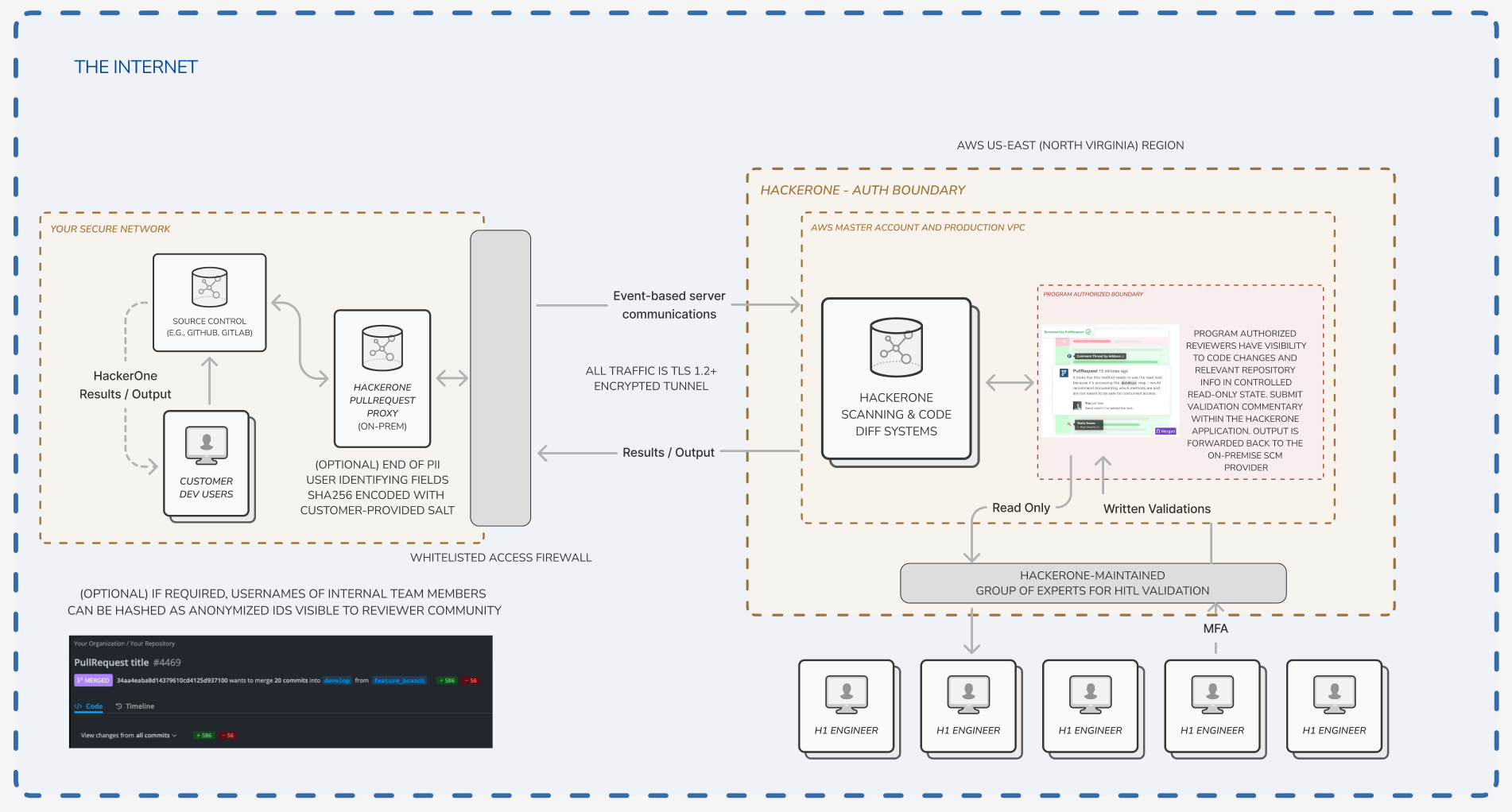
> For the complete documentation index, see [llms.txt](https://docs.pullrequest.com/on-premise-server/llms.txt). Markdown versions of documentation pages are available by appending `.md` to page URLs; this page is available as [Markdown](https://docs.pullrequest.com/on-premise-server/master.md).
# Introduction to HackerOne Code for On-Premise Integrations
For integrating HackerOne Code with self-hosted (on-premise) source code provider instances.
### HackerOne's PullRequest Proxy
HackerOne integrates with self-housed source code providers with the installation of **PullRequest Proxy**. This is a lightweight proxy server that facilitates required communications with our server.
This integration is used for [**h1 Validation**](https://www.hackerone.com/hub/continuous-validation), [**HackerOne Code**](https://www.hackerone.com/product/code), [**HackerOne Code Security Audit**](https://www.hackerone.com/product/code-security-audit)**,** and Software Composition Analysis (SCA).
### Dataflow Diagram
For a visualization of how PullRequest Proxy and our systems interact with self-hosted providers, see and download the diagram below.
Dataflow diagram
{% file src="/files/t8QM2VdA3Qac2pKDBwN9" %}
Click to download
{% endfile %}
### System Compatibility
PullRequest Proxy compatible with:
### Before Getting Started
Please review the following system requirements for each of our source code management on-premises integrations below.
{% tabs %}
{% tab title="GitHub Enterprise" %}
Be sure to send your PullRequest point of contact the version of [**GitHub Enterprise**](https://enterprise.github.com/releases) your team is currently running (along with any plans you have to update or change versions).
{% hint style="warning" %}
HackerOne's Pull Request Proxy for GitHub Enterprise standard integration is compatible with [**GitHub Enterprise 2.18 and above**](https://docs.github.com/en/enterprise-server) and **optimized for GitHub API version 3**.
If your team is running a prior version, *we highly recommend updating*. Previous versions may or may not work. Please contact us at with any issues.
{% endhint %}
If you have any custom needs or requirements that have not been discussed with HackerOne, please be sure to bring them to attention as early in the installation process as possible.
And, of course, if ever you have any questions or become blocked during the integration please get in touch with your dedicated HackerOne implementation specialist or account manager.
{% endtab %}
{% tab title="Bitbucket Data Center" %}
Be sure to send your HackerOne point of contact the version of [**Bitbucket Data Center**](https://confluence.atlassian.com/bitbucketserver/bitbucket-server-release-notes-872139866.html) **(or Bitbucket Server)** your team is currently running along with any plans you have to update or change versions.
{% hint style="warning" %}
HackerOne's Pull Request Proxy for Bitbucket Data Center and Bitbucket Server integration requires Personal Access Tokens which were introduced in **Bitbucket Server 5.5**.
For best performance, we recommend **Bitbucket Server 5.10** or higher.
If your team is running a prior version of Bitbucket Server 5.5, we recommend upgrading before continuing if feasible. If not, please reach out to to your HackerOne contact to discuss options.
{% endhint %}
If you have any custom needs or requirements that have not been discussed with HackerOne, please be sure to bring them to attention as early in the installation process as possible.
And, of course, if ever you have any questions or become blocked during the integration please get in touch with your dedicated HackerOne implementation specialist or account manager.
{% endtab %}
{% tab title="GitLab Self-Managed" %}
Be sure to send your HackerOne point of contact the version of [**GitLab Self-Managed**](https://about.gitlab.com/releases/) your team is currently running (along with any plans you have to update or change versions).
{% hint style="warning" %}
HackerOne's Pull Request Proxy for GitLab Self-Managed integration was built and optimized for **GitLab 11.0 and above** and **GitLab API v4.0**.
If your team is running a prior version, *we highly recommend updating*. Previous versions may or may not work. Please contact us at with any issues.
{% endhint %}
If you have any custom needs or requirements that have not been discussed with HackerOne, please be sure to bring them to attention as early in the installation process as possible.
And, of course, if ever you have any questions or become blocked during the integration please get in touch with your dedicated HackerOne implementation specialist or account manager.
{% endtab %}
{% tab title="Azure DevOps Server" %}
Be sure to send your HackerOne point of contact the version of [Azure DevOps 2019](https://docs.microsoft.com/en-us/azure/devops/server/release-notes/azuredevops2019u1?view=azure-devops) or [Azure DevOps 2020](https://docs.microsoft.com/en-us/azure/devops/server/release-notes/azuredevops2020?view=azure-devops) your team is currently running (along with any plans you have to update or change versions).
{% hint style="warning" %}
HackerOne's Pull Request Proxy for Azure DevOps Server integration was built and optimized for **Azure DevOps Server 2019 and above**.
If your team is running a prior version, *we highly recommend updating*. Previous versions may or may not work. Please contact us at with any issues.
{% endhint %}
If you have any custom needs or requirements that have not been discussed with HackerOne, please be sure to bring them to attention as early in the installation process as possible.
And, of course, if ever you have any questions or become blocked during the integration please get in touch with your dedicated HackerOne implementation specialist or account manager.
{% endtab %}
{% endtabs %}
### Quick Reference: Network & System Requirements
Here's a summary of the network and system requirements needed for HackerOne's PullRequest Proxy as a quick reference. Additional details are provided throughout the integration guide.
#### Minimum Resource Requirements
One (1) Linux virtual machine per source code management (SCM) provider instance.
* **CPU:** 8 vCPUs
* **Memory:** 16 GB RAM
* **Disk:** 500 GB available disk space
* **Operating System:** Linux, such as Amazon Linux, Red Hat Enterprise Linux, or a comparable supported Linux distribution
#### Supported SCM Providers
HackerOne's PullRequest Proxy is used for self-hosted or private cloud SCM environments, including:
* GitHub Enterprise Server
* GitLab Self-Managed
* Bitbucket Server / Bitbucket Data Center
* Azure DevOps Server
#### Firewall and Network Requirements
**Outbound from HackerOne's PullRequest Proxy**
The PullRequest Proxy must be able to make outbound connections to:
* `https://app.pullrequest.com` - *Required for communication with the HackerOne Code SaaS environment.*
* `https://content.pullrequest.com` - *Used for auto-upgrade functionality (recommended, but optional).*
* The customer’s SCM provider - *Required for communication between HackerOne's PullRequest Proxy and the source code provider.*
* Commonly used ports: `80` / `443` - *Depending on how TLS termination is configured.*
**Inbound to HackerOne's PullRequest Proxy**
The customer’s SCM provider must be able to make inbound calls to the PullRequest Proxy.
* Port `5012` - *Used for HTTP or HTTPS/TLS communication between the SCM provider and HackerOne's PullRequest Proxy.*
#### Notes
* Network access should be reviewed with the customer’s infrastructure, firewall, and SCM administration teams before installation.
* TLS termination approach may vary by environment.
* If the customer operates multiple SCM provider instances are used (i.e., a Bitbucket Server tenant and GitHub Enterprise Server tenant), plan for one PullRequest Proxy VM per SCM provider instance.
### Cross-team Coordination: SCM Provider Inventory
{% hint style="info" %}
**OPTIONAL**: This section includes a spreadsheet template to use for collecting source code management (SCM) tenant information from various teams across your organization where repository assets are in scope of HackerOne service.
{% endhint %}
In most cases source code repositories in scope of HackerOne services span multiple source code management (SCM) tenants used by various product teams and business units. To respect your teams' bandwitch and help with coordination, we've provided a spreadsheet template for collecting the information we need to get started with integration.
**Download link:**
{% file src="/files/2hW5nQ8fATeGbC0pCmXI" %}
It includes an `INVENTORY TAB` for collecting details and `EXAMPLE AND INVENTORY GUIDE` with instructive examples, quick links to documentation, and field completion guidance.
*The `EXAMPLE AND INVENTORY GUIDE` tab of the SCM Provider Inventory Template.*
The spreadsheet template is not ingested or programmatically processed. Adaption for including data and categorizations unique to your organization is encouraged.
If you choose to use this, simply send the spreadsheet to your HackerOne team once completed.